



PCB Assembly BOM Checklist: 9 File Checks Before Release
A PCB assembly BOM checklist should do more than confirm that a spreadsheet contains component values. The bill of materials defines what to buy and populate; the placement file defines where and how to place it. Both must agree with the released board and assembly instructions.
This checklist is intended for engineers, buyers, and project managers preparing a new build or a controlled revision. It does not prescribe a universal spreadsheet format: agree the assembler’s required columns and naming rules before export.
1. Start the PCB assembly BOM checklist with revision control
Put the assembly number, revision, variant, and release date in the package manifest. Check that the schematic, layout, fabrication output, BOM, placement file, and drawing describe the same design. A file name such as final-new is not a reliable revision control method.
Preserve the approved package and record changes separately. Replacing one spreadsheet after quotation can alter procurement and production assumptions even when the board outline has not changed.
2. Specify manufacturer part numbers
For each populated line, provide the manufacturer and full orderable part number. Nominal value and footprint alone may omit voltage rating, tolerance, dielectric, temperature range, package height, or product options. Distributor identifiers can help sourcing, but they should not hide the manufacturer’s identity.
Distinguish required parts from explicitly approved alternates. If alternates require customer approval, state that constraint clearly. Do not leave purchasing staff to infer engineering equivalence.


3. Reconcile quantities and reference designators
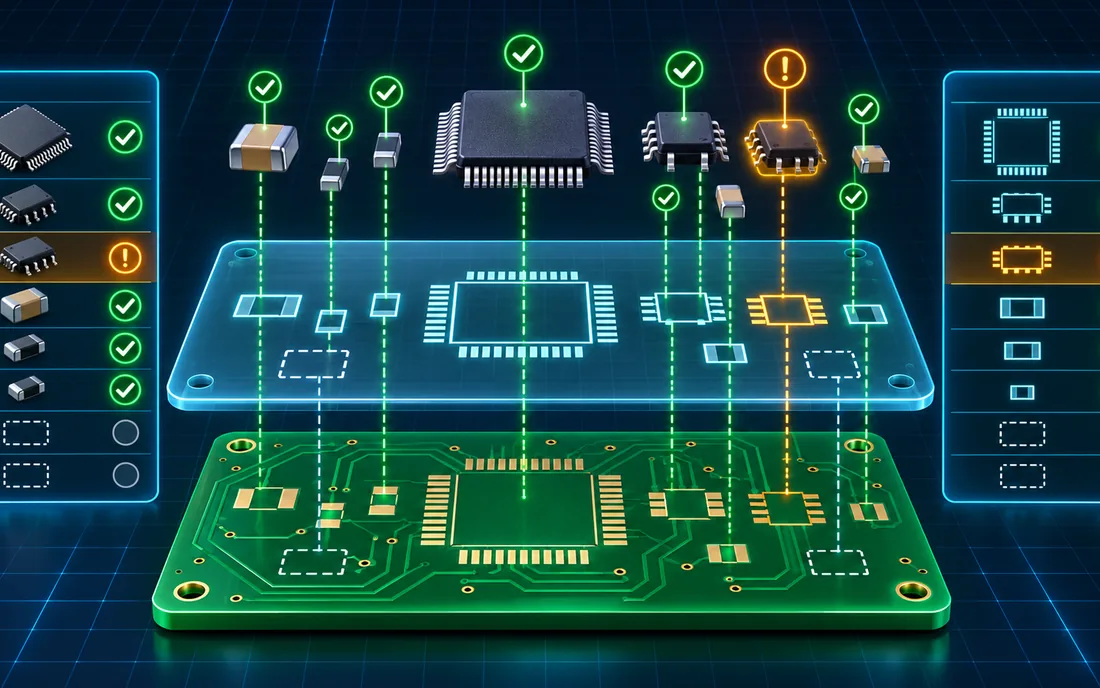
Count the designators on each line and compare the total with the quantity per assembly. Resolve duplicated designators, blank cells, and positions appearing on multiple component lines. Document whether quantities are per board or per production panel.
For example, a line listing R1, R2, and R3 with quantity two is ambiguous. The correct action is to resolve the design data, rather than silently change either quantity or list to make the import pass.
4. Separate DNP positions from missing information
Do-not-populate positions should be explicit and consistent with the assembly drawing. An absent BOM line is not always an intentional DNP instruction. Define whether unpopulated components remain in the placement export and how the supplier should handle them.
A variant matrix is useful when one board supports several configurations. Assign each build a unique variant identity and avoid handwritten instructions such as fit these parts only for some units.
5. Match the BOM and CPL designators
Compare the sets of designators in the BOM and component placement list. Investigate items present in only one file. Exclude non-placed items, such as certain mechanical or service parts, through explicit instructions rather than assuming every mismatch is an error.
Different assemblers can use different BOM and placement-file matching rules. Confirm KKPCB’s accepted fields and naming conventions for the specific project before release.
6. Verify coordinates, units, side, and rotation
The pick-and-place file normally communicates reference designator, position, board side, and orientation. Check coordinate origin and units, and review bottom-side conventions with the assembler. Rotation conventions can differ between CAD libraries and production systems.
Use an assembly drawing with pin-one and polarity information for parts that cannot be interpreted safely from a generic package name. Inspect a graphical placement preview against the design instead of relying only on a successful file import.
7. Check footprints and component options
Confirm that the selected orderable package matches the actual land pattern. Similar part names can have different pinouts or body dimensions. Include height restrictions, connector orientation, and any mechanical mating requirements that affect assembly.
Resolve footprint uncertainty during PCB layout review, before PCB fabrication makes the geometry expensive to change.
8. Define sourcing and special handling
Identify turnkey, customer-supplied, and mixed sourcing lines. Record restrictions on substitutions and required traceability documents. Flag components with manufacturer-defined moisture, storage, programming, or thermal handling requirements and supply the applicable documentation.
Do not create generic baking instructions from a checklist. Handling decisions depend on the component’s specified conditions and actual exposure history.
9. Approve the completed PCB assembly BOM checklist
Assign one person to approve the reconciled package. Keep a list of open questions with owners and dispositions. A complete package includes fabrication information, the BOM, placement data, assembly drawings, and any programming or test documents needed for the agreed scope.
For PCB assembly, consistency across files is more useful than adding columns that nobody maintains.

Frequently asked questions
Is a BOM enough to manufacture an assembled board?
No. The BOM identifies components, but fabrication, placement, mechanical, and acceptance information are also needed for the relevant scope.
Should approved alternates share a BOM line?
They may if the format preserves a clear primary selection and approval status. Agree the structure with the assembler; avoid a cell containing several unexplained part numbers.
Does an import success prove the files are correct?
No. Importing checks machine readability, not the design’s intended configuration, polarity, or electrical suitability.
Prepare your next release
Send KKPCB your assembly requirements with the revision manifest and unresolved questions. Confirm accepted formats and sourcing responsibilities before the purchasing and production release.
